
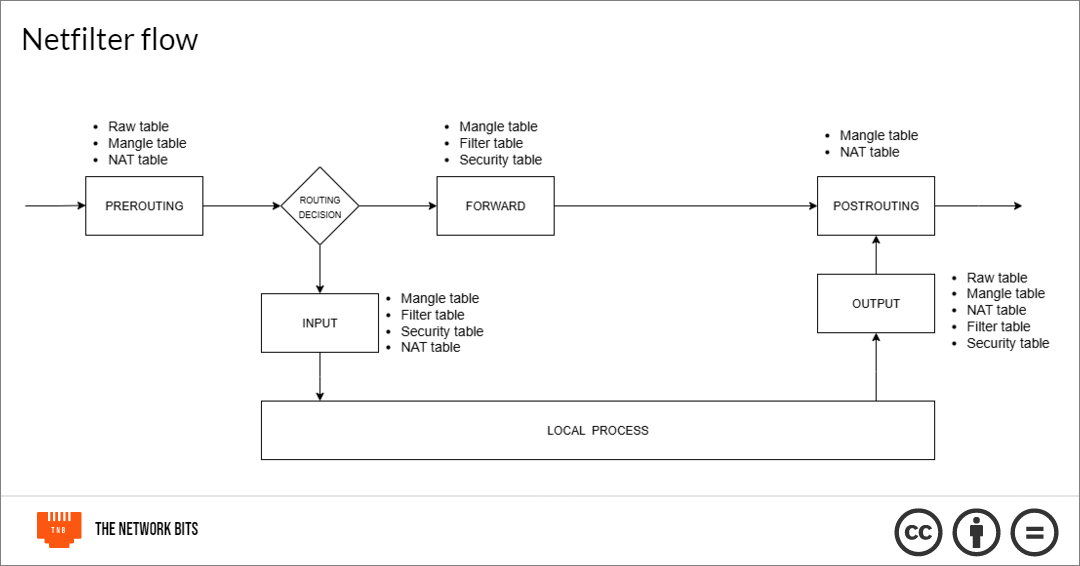
Understanding how packet filtering with iptables works, and how the packets flow in the Linux kernel
Firewalls are an important piece of hardware/software for network security. They can range from dedicated hardware like Cisco ASA or Firepower series, Fortinet FortiGate, or Sophos devices to software like Windows Defender, to cloud firewalls like web application firewalls (WAFs).
The features of firewalls range from packet filtering, to establishing VPN connections, providing network address translation (NAT), defining security zones, URL filtering and preventing DoS attacks.
In Linux, host-based firewalls are used to filter and control network traffic based on user-defined rules. These tools can perform simple and advanced operations, such as packet filtering, stateful inspection, and Network Address Translation (NAT).These include:
iptables
nftables
firewalld
ufw
These are merely interfaces for configuring the real Linux packet inspection mechanism, which is netfilter. Netfilter is a kernel-level subsystem while the other tools exist in the user-space. In this article, we will be using iptables.
In this article, we’re going to look at:
Basic concepts of firewalls and iptables
Packets
Rules
Actions
Chains
Hooks
Tables
How packets flow in a Linux system
Creating firewall rules in iptables (with real-world example)
Basic Concepts
Packets:
A packet is a unit of information that has been broken down to be sent over a network. It is a common networking concept. It is what is been accepted or rejected in firewall rules.
Rules:
Firewalls inspect packets and make the decisions to allow or drop packets coming in or going out of the system. These decisions are made based on rules. It consists of the protocol, the source and destination IP addresses, the source and destination ports, and the action. syntax is:
iptables --table TABLE -A/-C/-D... CHAIN rule --jump TargetAnd here is an example:
sudo iptables -A INPUT -p tcp --dport 22 -j ACCEPT In this iptables example is an input rule to accept any traffic from the TCP protocol that comes to port 22 (SSH). It allows SSH connections.
Actions/Targets:
In the example above, the action, specified by the flag -j, tells the system what to do to any packet that matches the rule. The common ones are ACCEPT, DROP, REJECT.
ACCEPT means the packet should be allowed to pass through.
DROP discards the packet silently without letting the sender know.
REJECT discards the packet and lets the sender know.
Chains:
A chain is a sequence of rules which a packet is checked against. If it matches the rules in the chain, the specified action is taken. There are five chains: PRE-ROUTING, INPUT, FORWARD, OUTPUT, POST-ROUTING.
PRE-ROUTING alters packets immediately the enter the system
INPUT handles packets destined for the host
OUPUT handles packets originating for the host
FORWARD handles packets that are passing through the host
POST-ROUTING alters packets after routing, just before they leave
This is what an example INPUT chain should look like:
Chain INPUT (policy ACCEPT)
num  target     prot opt source      destination
1    ACCEPT     tcp  --  anywhere    anywhere     tcp dpt:ssh
2    ACCEPT     tcp  --  anywhere    anywhere     tcp dpt:http
3    DROP       all  --  anywhere    anywhere
Hooks:
A netfilter hook is a point in the Linux kernel’s network stack where packets can be intercepted and processed. The hooks include:
Ingress hook
Pre-routing hook
Input hook
Forward hook
Output hook
Post-routing hook
Egress hook
The ingress and egress hooks are device-level (layer 2) hooks, while the others are IP-layer (layer 3) hooks that deal with IP packets. These hooks are what the chains connect to and register callback functions to be executed on any packet traversing that route. The hooks are basically locations on the kernel where chains (list of rules) are attached to by user-space programs like iptables, or nftables to tell the kernel what to do with the packet when it hits the hooks.
Tables:
Tables are categories that help to group together rules based on their functions. Different tables contain different chains. For example, the INPUT, OUTPUT and FORWARD belong to the filter table. The tables in iptables are:
Filter table
NAT table
Mangle table
Raw table
Security table
Filter table: This is the main table for packet filtering. It is used to allow and block traffic destined for the host or originating from the host. Traffic from here goes through the following chains:
PRE-ROUTING → INPUT for traffic coming into the host
PRE-ROUTING → FORWARD → POST-ROUTING for traffic passing through the host
OUTPUT → POST-ROUTING for traffic originating from the host
The chains controlled by this table are the INPUT, FORWARD, and OUTPUT.
And the actions are ACCEPT, DROP, REJECT.
NAT table: This table is responsible for handling network address translation. This can enable multiple devices in a private network to share a single public IP address. The nat table contains the PRE-ROUTING, OUPUT and POST-ROUTING chains. It also contains the following actions:
DNAT – Modifies the destination address or port of the packet
SNAT – Changes the source IP address or port of the packet to one user specifies
MASQUERADE – Like SNAT but changes to a dynamic IP given by a protocol like DHCP
REDIRECT – It redirects incoming traffic to specified port on the host
RETURN – Stops processing the chain
Mangle table: This table is used for modifying packet headers and changing things like Time To Live (TTL) and Type of Service (ToS) bits. Mostly QoS. All five chains are contained in it —PRE-ROUTING, INPUT, OUTPUT, FORWARD, POST-ROUTING. The actions in this table include, but are not limited to:
MARK – Set a fwmark on the packet
CONNMARK – Marks connections for tracking.
SECMARK – Assign an SELinux security context
TTL – Change Time To Live value
HL – IPv6 equivalent of TTL (Hop Limit)
CLASSIFY – Assign a traffic control class
ACCEPT
DROP
RETURN
Raw table: This table is used to configure exceptions from connection tracking, because the mangle table which comes after it could mark connections and track them. This table is used to set exemptions before the packets reach there. It contains only the PRE-ROUTING and OUTPUT chains. Some of the actions here include:
NOTRACK
ACCEPT
DROP
RETURN
Security table: This is used together with SELinux and other Linux Security Modules (LSMs) for Mandatory Access Control (MAC). It contains the INPUT, OUTPUT and FORWARD chains. Actions include:
SECMARK – Sets a security context mark on a packet, which can later be used by SELinux or other LSMs for access control decisions
CONNSECMARK – Apply security context marks on network connections
ACCEPT
DROP
RETURN.
How packets flow in the Linux system
In the Linux system, here is how it works. When the data enters the system through the network interface card (NIC), it passes through different hooks in the kernel’s netfilter framework.
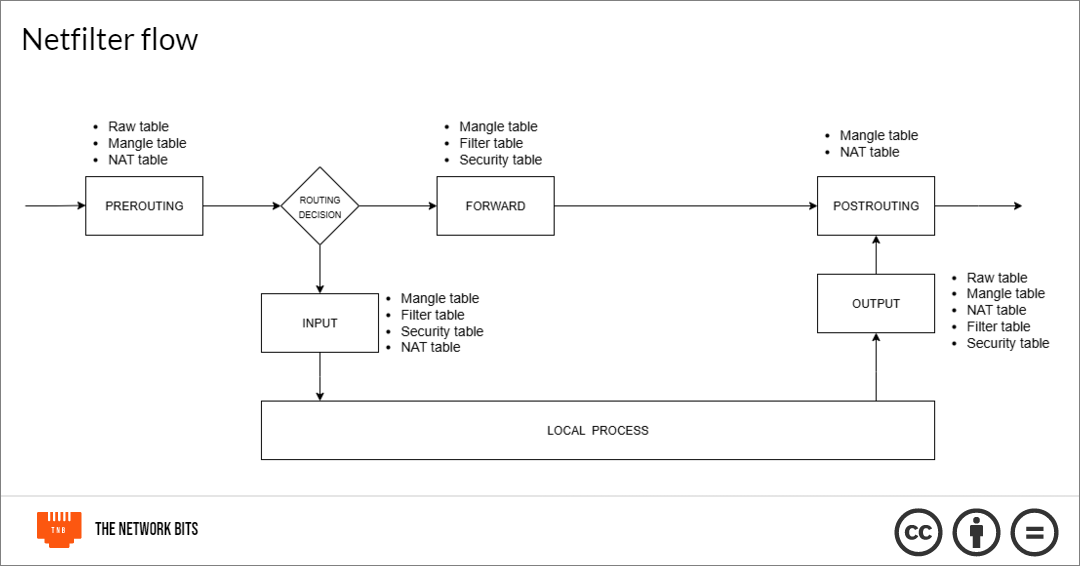
First, it hits the PRE-ROUTING hook and is passed through the PRE-ROUTING chains of the tables. The raw table first to see if there are any exceptions to connection tracking, then the PRE-ROUTING chain in the mangle table and PRE-ROUTING chain in the NAT table.
The packet is then routed. If it’s for a local process, it’s sent to the INPUT hook. If it’s to be forwarded to another host, it is sent to the FORWARD hook.
When it hits the INPUT hook, it is passed through the INPUT hook and is passed through the INPUT chain in the mangle table, then the INPUT chain in the filter table, then the INPUT chain in the security table, then the INPUT chain in the NAT table that alters packets going to the local sockets. Then it sends it to the process.
For the packets that are to be forwarded, they go through the FORWARD chain of the mangle table where QoS operations can be done, then to the FORWARD chain of the filter table, and the FORWARD chain of the security table.
For packets generated by local processes, the are sent to the OUTPUT chains of the raw table, then mangle table, then NAT table, then filter table and finally security table before moving on to the PRE-ROUTING chains.
Both the OUTPUT and FORWARD chains feed into the POST-ROUTING chains, and the packet goes through the POST-ROUTING chains of the mangle table and then, the NAT table before being sent out of the machine.
Creating firewall rules with iptables
Let’s say you have a database server (PostgreSQL), and want to achieve three (3) things:
Prevent people from trying to SSH into your database server. You want to restrict that to only a particular IP address of 203.0.113.45.
Make sure that the server is only accessible from your private network (possibly your webserver) of 192.168.1.0/24.
Ensure that already established connections are respected, and your host doesn’t block packets from those.
Here’s how you will go about it:
# Allow loopback
iptables -A INPUT -i lo -j ACCEPT

# Allow established/related
iptables -A INPUT -m conntrack --ctstate ESTABLISHED,RELATED -j ACCEPT

# Restrict SSH
iptables -A INPUT -p tcp --dport 22 -s 203.0.113.45 -j ACCEPT
iptables -A INPUT -p tcp --dport 22 -j DROP

# Allow DB only from private network
iptables -A INPUT -p tcp --dport 5432 -s 192.168.1.0/24 -j ACCEPT
iptables -A INPUT -p tcp --dport 5432 -j DROP
Here, we can see some flags:
The
-Aflag which is the short for--append. It is used to add rules to chains. Other chain commands include-C(--check) for checking whether a particular rule exists in a chain,-D(--delete) for deleting a rule in a chain, and-L(--list)for listing the rules in a specified chain or all rules.The
-pflag is used to specify the protocol. Here, we dealt with the TCP protocol all through.The
-iflag is used to specify the interface through which a packet was received. Here, the loopbacklointerface is specified in the first rule.The
-jflag (--jump) is used to specify the target (action) of the chain. That is what should happen to a packet that matches the rules.The -s flag (
--source) is used to specify source IP addresses.The
--dportflag is used to specify the destination port of the packet. If the packet has a destination port matching what is specified, the specified action will be taken on it.The
-mflag (--match) It is part of iptables-extensions. It is used to load modules to do extra things in iptables. Here, it’s used to work with theconntrackmodule for connection tracking.The
--ctstateflag is used to match connection states for connection tracking. Here, it is used to specify that packets with ESTABLISHED or RELATED connection states should be allowed.
So, the first rule says: append to the INPUT chain, a rule that allows all traffic from the loopback interface.
The second rule says: append to the INPUT chain, a rule that allows all packets from already established connections.
The third rule says: append to the INPUT chain, a rule that allows all traffic on TCP port 22 (SSH) from 203.0.113.45.
The fourth says: append to the INPUT chain, a rule that denies every other SSH traffic.
The fifth rule says: append to the INPUT chain, a rule that allows connections to TCP port 5432 (PostgreSQL) from the 192.168.1.0/24 subnet.
The sixth rule says: append to the INPUT chain, a rule that drops every other connection to that port.
But does it last?
With iptables, the rules are ephemeral. They go away with every reboot. So, to make the configurations permanent, we need to save them. For Red Hat based distributions, you need the iptables-services package. Because iptables is not a service, we need to install the iptables service that enables systemd to manage it and start it on boot. First, install it:
sudo yum install -y iptables-servicesThen you save configurations:
sudo iptables-save | sudo tee /etc/sysconfig/iptablesThen you enable iptables service so it always starts on reboot:
sudo systemctl enable iptablesTo do that, for Debian-based distros, we need the iptables-persistent package. Install it with this:
sudo apt install iptables-persistent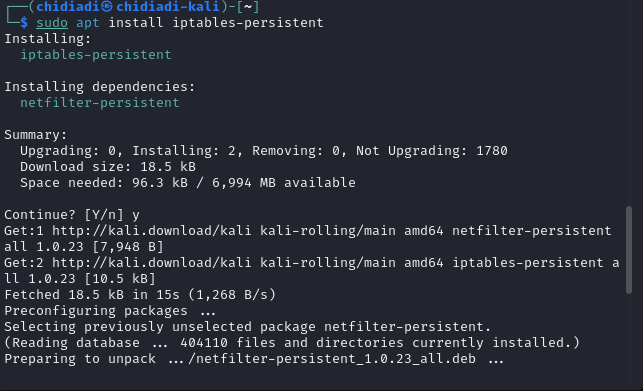
Ensure that the netfilter-persistent service is enabled.
sudo systemctl is-enabled netfilter-persistent.serviceIf not, enable it.
sudo systemctl enable netfilter-persistent.service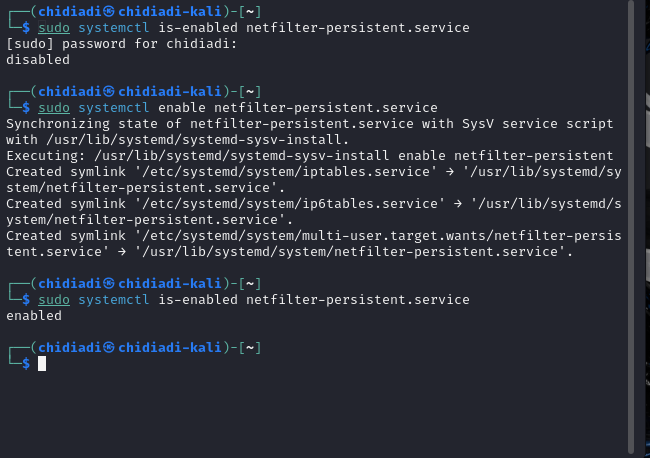
Now, whenever you modify your configurations, you can save them with
netfilter-persistent saveWhat if I forget the commands?
You can always use the iptables command as with CLI. But just so you know, there are different man pages for iptables and iptables-extensions. So, you won’t find any match commands for example in the first man page.
Conclusion
Thank you for reading. If you enjoyed this, share the article, and subscribe to the newsletter if you haven’t. You can also follow on X or on LinkedIn. Thank you.

Leave a Reply